Tips for Creating a Cozy and Productive Home Office Space


Creating a home office that feels both cozy and productive can make a significant difference in your workday. Whether you’re working from home full-time or occasionally, having a dedicated space that inspires focus and comfort can boost your efficiency and overall wellbeing. Here are practical tips to help you design a home office that meets your needs.
Choose the Right Location
Start by selecting the best spot in your home for your office. Ideally, this space should be quiet and free from distractions. If possible, pick a room or corner with natural light, as sunlight can improve your mood and energy levels.
Consider Privacy and Noise
– Avoid high-traffic zones with lots of noise.
– Use a room divider or curtains if you’re setting up in a shared space.
– Consider noise-canceling headphones or a white noise machine to block out distractions.
Invest in Comfortable and Functional Furniture
Your office furniture plays a major role in your productivity and comfort. Ergonomics is key.
Desk and Chair
– Choose a desk that fits your space and equipment needs.
– Invest in an ergonomic chair that supports good posture.
– Adjustable furniture can help you switch between sitting and standing.
Storage Solutions
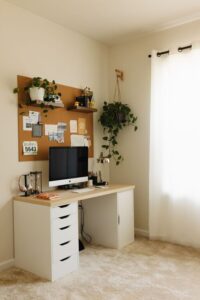
– Use shelves, drawers, or filing cabinets to keep documents and supplies organized.
– Avoid clutter to maintain focus and a tidy environment.
Optimize Lighting
Good lighting reduces eye strain and creates a warm atmosphere.
– Combine natural light with soft ambient lighting.
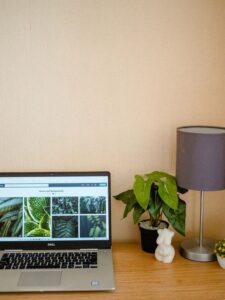
– Use task lighting like a desk lamp to illuminate your work area.
– Avoid harsh overhead lights or glare on screens.
Personalize Your Space
Adding personal touches makes your office a place you enjoy spending time in.
– Decorate with plants for a touch of nature and improved air quality.
– Add artwork or photos that inspire and motivate you.
– Choose colors and materials that make you feel calm and focused.
Keep Technology Organized and Efficient
Technology is essential to most home offices, but it can also create clutter.
– Use cable organizers and holders to keep wires tidy.
– Position your computer screen at eye level to reduce neck strain.
– Make sure your internet connection is strong and reliable.
Establish Zones and Routines
Creating different zones for work tasks can help you stay organized and productive.
– Designate areas for computer work, reading, and brainstorming.
– Use a whiteboard or bulletin board for notes and ideas.
– Set clear start and finish times to maintain work-life balance.
Pay Attention to Air Quality and Temperature
Comfort includes the air you breathe and how warm or cool your space feels.
– Open windows frequently or use an air purifier to refresh the air.
– Adjust heating or cooling to a comfortable temperature.
– Incorporate a small fan or space heater if needed.
Maintain Cleanliness and Order
A clean workspace reduces stress and boosts efficiency.
– Spend a few minutes at the end of each day tidying your desk.
– Use trays and containers to store office supplies.
– Regularly clean your computer, keyboard, and other equipment.
Add Comfort Elements
Small touches can make your workspace more inviting.
– Include a soft rug or cushion for warmth.
– Keep a water bottle or coffee mug nearby.
– Play gentle background music if it helps your concentration.
Final Thoughts
A home office that balances comfort and productivity is achievable with thoughtful planning and some creativity. Remember, the ideal workspace reflects your unique preferences and needs, so feel free to experiment until you find what works best. With these tips, you can create a space that not only supports your work but also feels like a comforting retreat during your day.